> ## Documentation Index
> Fetch the complete documentation index at: https://docs.swap.coffee/llms.txt
> Use this file to discover all available pages before exploring further.
# Examples with Visualizations
This page describes and visualizes processes which are essential for users interacting with **swap.coffee DEX**.
Keep in mind that in order to make things easier to understand, many aspects of the visualizations have been simplified.
## Vault Creation
If you are interested in adding new asset to the **swap.coffee DEX**, firstly you must create a **Vault** for it.
As shown below, you must send a [special message]() to the **Factory** and wait until it deploys a **Vault** for you.
If you are creating a **Vault** for **jetton**, make sure it goes through activation process
as described [here](/technical-guides/dex/tlb-schemes#activatevaultinternal).
You can check whether **Vault** is active by calling `is_active` get-method on it.
If it is not, please contact us via Telegram [@swap.coffee DEV Chat](https://t.me/swapcoffee_dev_chat).
Our recommendation for gas is `0.05 TON`. Excesses **won't** be returned.
 ## Pool Creation
After you ensured that **Vaults** for both of the assets you want to create pool for exist (or you created them as well),
it is time to create the **Pool**.
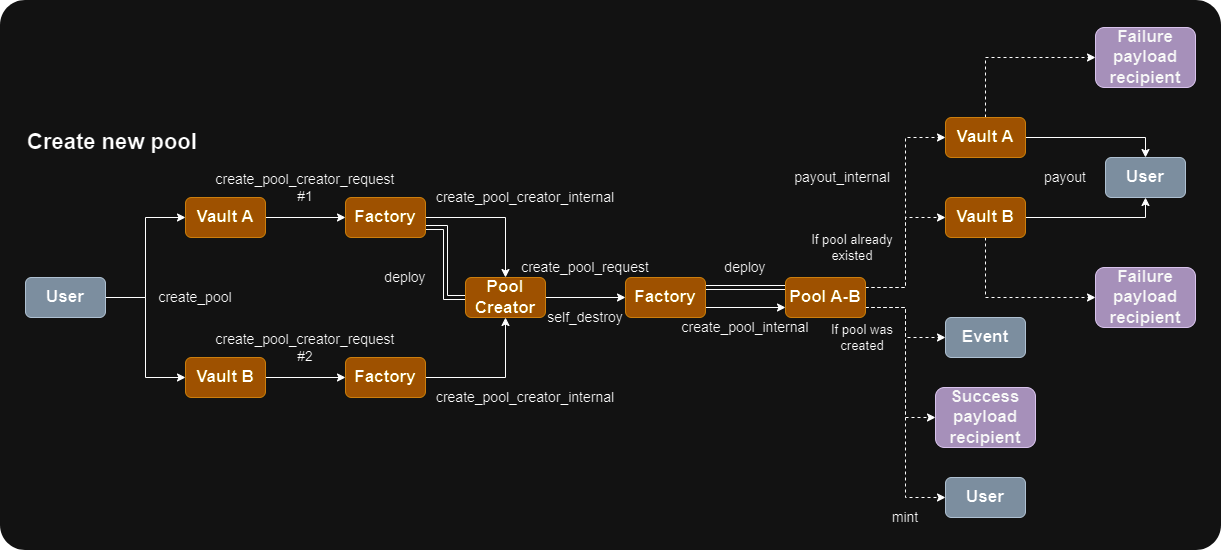
Unlike many other **DEX**es, it is not possible in **swap.coffee DEX** protocol to create new **Pool** without providing
it with initial liquidity. Therefore, in order to create a new **Pool**, you must send two messages: one to pool's
first asset **Vault**, and second to pool's second asset **Vault**. After they both reach their destinations,
an inter-contract communication will be initialized that will lead to new **Pool** creation.
Keep in mind that pools with AMM strategies other than **Constant Product** may be created by **DEX** administration only.
If you're interested in creation of such a pool, please contact us via Telegram [@swap.coffee DEV Chat](https://t.me/swapcoffee_dev_chat).
Our recommendation for gas is `0.1 TON` for each message. Excesses will be returned.
If you're using notifications, more gas may be needed.
## Pool Creation
After you ensured that **Vaults** for both of the assets you want to create pool for exist (or you created them as well),
it is time to create the **Pool**.
Unlike many other **DEX**es, it is not possible in **swap.coffee DEX** protocol to create new **Pool** without providing
it with initial liquidity. Therefore, in order to create a new **Pool**, you must send two messages: one to pool's
first asset **Vault**, and second to pool's second asset **Vault**. After they both reach their destinations,
an inter-contract communication will be initialized that will lead to new **Pool** creation.
Keep in mind that pools with AMM strategies other than **Constant Product** may be created by **DEX** administration only.
If you're interested in creation of such a pool, please contact us via Telegram [@swap.coffee DEV Chat](https://t.me/swapcoffee_dev_chat).
Our recommendation for gas is `0.1 TON` for each message. Excesses will be returned.
If you're using notifications, more gas may be needed.
 ## Liquidity Provisioning
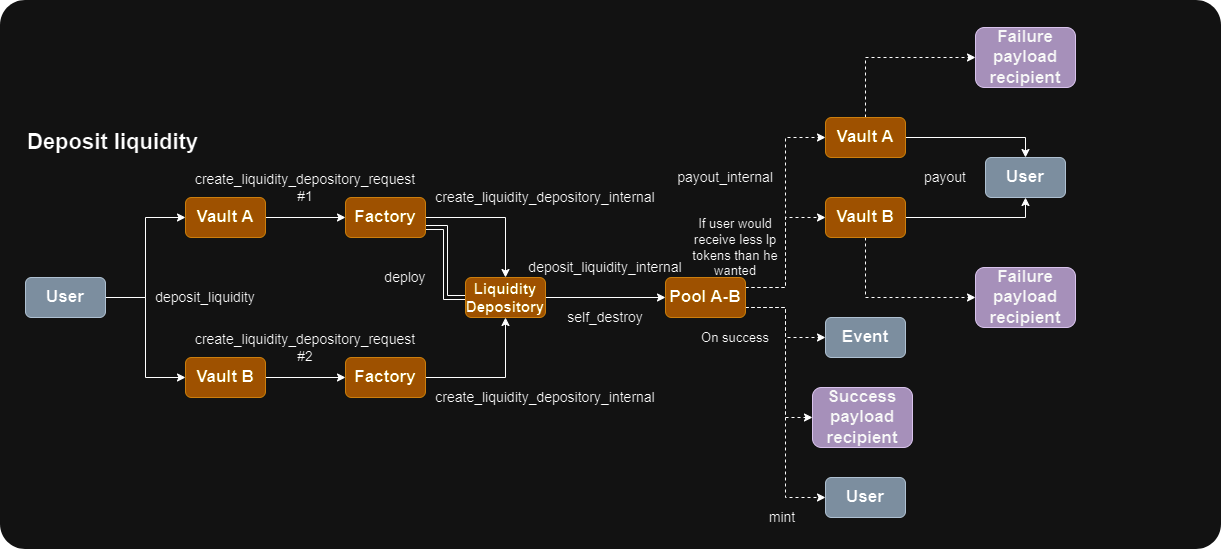
Similarly to **Pools** creation, liquidity provisioning has been developed as an interaction with two corresponding **Vaults**.
Our recommendation for gas is `0.1 TON` for each message. Excesses will be returned.
If you're using notifications, more gas may be needed.
## Liquidity Provisioning
Similarly to **Pools** creation, liquidity provisioning has been developed as an interaction with two corresponding **Vaults**.
Our recommendation for gas is `0.1 TON` for each message. Excesses will be returned.
If you're using notifications, more gas may be needed.
 ## Liquidity Withdrawal
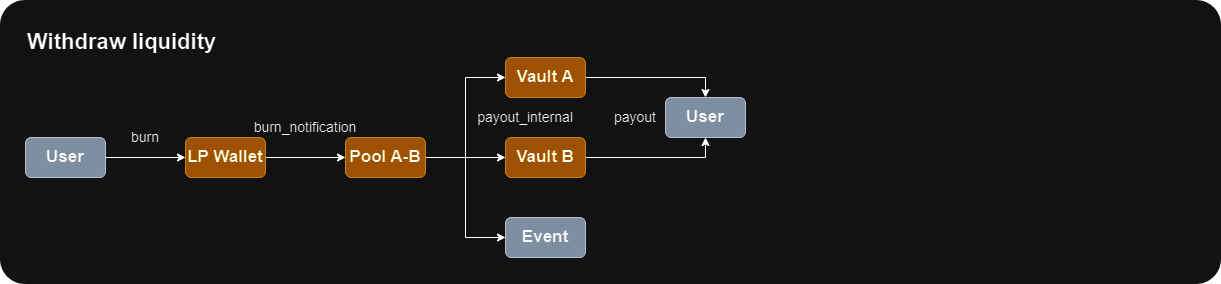
Whenever you provide **swap.coffee DEX** pools with liquidity, you get LP (Liquidity Provisioning) tokens in return.
Those tokens correspond to a **Jetton Standard** in which **Pool** serves as a **Jetton Master** contract.
Thereby, in order to get funds back, all you need to do is to burn LP tokens you currently own.
Also, our LP jetton wallets support `custom_payload` on burn so that users may specify withdrawal liquidity parameters
to secure the operation. You can read more about it in [TL-B schemes](/technical-guides/dex/tlb-schemes#withdrawliquidityparams) section.
## Liquidity Withdrawal
Whenever you provide **swap.coffee DEX** pools with liquidity, you get LP (Liquidity Provisioning) tokens in return.
Those tokens correspond to a **Jetton Standard** in which **Pool** serves as a **Jetton Master** contract.
Thereby, in order to get funds back, all you need to do is to burn LP tokens you currently own.
Also, our LP jetton wallets support `custom_payload` on burn so that users may specify withdrawal liquidity parameters
to secure the operation. You can read more about it in [TL-B schemes](/technical-guides/dex/tlb-schemes#withdrawliquidityparams) section.
 ## Swap
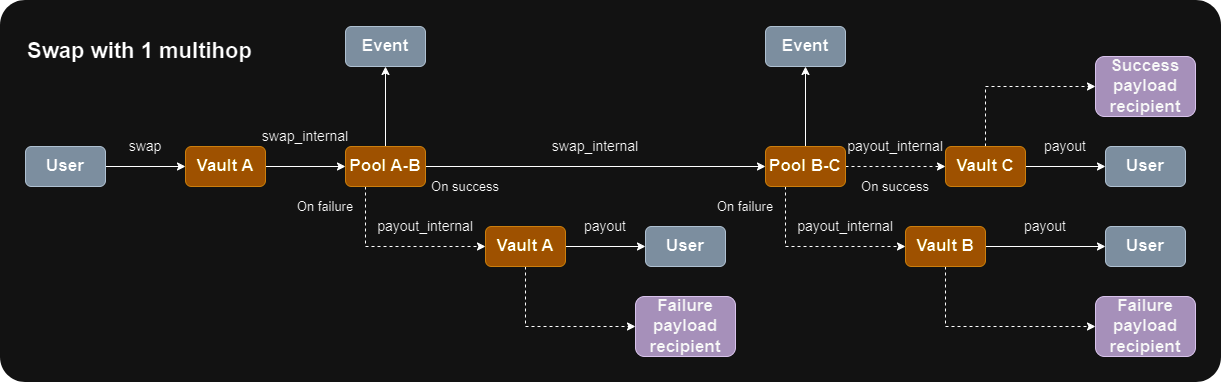
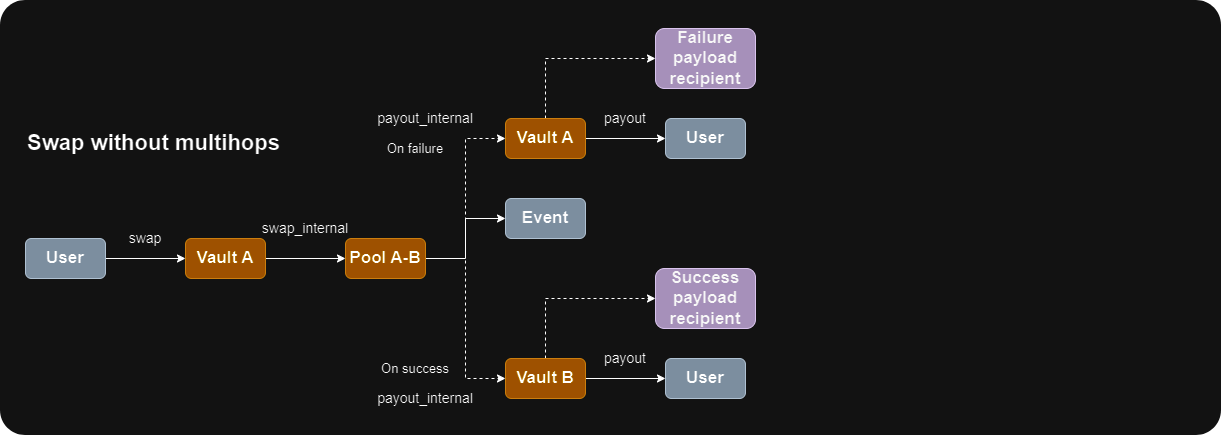
**swap.coffee DEX** supports direct swaps (which involve only one **Pool** in an exchange),
multi-hop swaps (when multiple **Pools** are being involved by performing swaps after each other) and
even multi-dex swaps (thankfully to custom payloads support via our notification system).
As stated previously, visualizations have been simplified: in particular, all **Vaults**, despite their asset-type accordance,
are shown as just a simple regular **Vault**. In real world, the actual message you send to the **Vault** to initiate swap
depends on your initial asset type. In a similar way some other (inter-contract and outgoing) messages may also differ.
Our recommendation for gas is `0.1 TON` for the transaction itself plus `0.05 TON` for every additional swap step after the first one.
So, for example, if you're performing a direct swap, our recommendation is `0.1 TON`,
but if your swap route consists of 3 steps (A -> B -> C -> D), then our recommendation is `0.1 + 0.05 * 2 = 0.2 TON`.
Actual usage should be much lower and all the excesses will be returned.
If you're using notifications, more gas may be needed.
### Direct
## Swap
**swap.coffee DEX** supports direct swaps (which involve only one **Pool** in an exchange),
multi-hop swaps (when multiple **Pools** are being involved by performing swaps after each other) and
even multi-dex swaps (thankfully to custom payloads support via our notification system).
As stated previously, visualizations have been simplified: in particular, all **Vaults**, despite their asset-type accordance,
are shown as just a simple regular **Vault**. In real world, the actual message you send to the **Vault** to initiate swap
depends on your initial asset type. In a similar way some other (inter-contract and outgoing) messages may also differ.
Our recommendation for gas is `0.1 TON` for the transaction itself plus `0.05 TON` for every additional swap step after the first one.
So, for example, if you're performing a direct swap, our recommendation is `0.1 TON`,
but if your swap route consists of 3 steps (A -> B -> C -> D), then our recommendation is `0.1 + 0.05 * 2 = 0.2 TON`.
Actual usage should be much lower and all the excesses will be returned.
If you're using notifications, more gas may be needed.
### Direct
 ### With multi-hops